LongCat-Video is interesting because it promises something bigger than a short prompt-to-video demo: one foundation model for text-to-video, image-to-video, video continuation, long-video generation, and interactive video workflows. That promise is exciting, but it also creates the real question of this review: does the open model feel like a practical local tool, or does it collapse under its own weight? After running it locally, my verdict is sharper than before: LongCat-Video is a serious foundation model with strong short-scene generation potential, but its best moments only appear when the prompt gives it a real cinematic target, and its hardware appetite is part of the story. I tested sixteen 480p text-to-video outputs, from quick 45-frame checks to a broader 61-frame visual set covering fashion rain, jazz-club lighting, macro product advertising, flame cooking, sci-fi interiors, sports motion, and reflective travel scenes.
Official sources I used: the LongCat-Video GitHub repository, the LongCat-Video Hugging Face model page, and the technical report.
Quick Reader Guide
If you want to know… | Start here | What you will find |
|---|---|---|
Whether this is a real local test or AI video model test | Test Evidence | 16 generated videos with frames, playable MP4 files, prompts, and measured purpose |
LongCat-Video benchmark numbers and GPU use | Runtime Metrics | Per-sample runtime and peak CUDA memory, plus the VRAM chart |
Which clips looked most useful | Generated Works Table | File-by-file notes on scene type, prompt direction, and measured result |
How it compares with Wan, HunyuanVideo, ComfyUI, and hosted systems | Comparison With Similar Video Models | Workflow-level comparison rather than a generic feature list |
Whether you should try it | Editorial Verdict and Best Use Cases | My practical recommendation after running the model locally |
LongCat-Video setup and install details | Installation Snapshot | Repository, uv environment, CUDA wheel, xFormers, and model download commands |
Read this LongCat-Video review as a practical LongCat-Video setup, LongCat-Video install, and AI video model test rolled into one field report. I keep coming back to the same question throughout the article: whether LongCat-Video behaves like a usable local video model when the review moves beyond a single attractive demo clip and into repeated tests, runtime numbers, VRAM pressure, prompt behavior, and reproducible setup details.
Why LongCat-Video Is Worth Watching
The official LongCat-Video materials describe a 13.6B-parameter foundation model that unifies text-to-video, image-to-video, and video-continuation tasks. They also emphasize long-video generation, coarse-to-fine inference, Block Sparse Attention, and 720p/30fps generation as the broader design target. I did not try to turn this local run into a full minute-long benchmark, but I used those official capabilities as the lens for the test: can the model build attractive scenes from text, can it keep motion coherent for short clips, and does the measured cost match the ambition?
The most important ability I saw is not simply that it can make a clip. Many video models can do that. The useful ability is that LongCat-Video responds to shot language: a rainy runway with rim light feels different from a perfume macro shot; a street-food flame prompt behaves differently from a museum light-installation prompt. That is where the model becomes worth reading about. It is less compelling as a generic validation demo and more compelling as a local scene engine when the prompt includes lighting, camera movement, material detail, and one clear motion idea.
This also gives the test a clear tension. The official model family points toward long-form and multi-task video generation, while my local run proves a smaller but still meaningful slice: 16 real 480p outputs, stable 41.6GB-class memory use, and a visible difference between plain prompts and more cinematic prompts. In other words, the model has an exciting capability story, but the practical entry fee is high.
What I Tested
I tested LongCat-Video as a foundation video generation model, not as the avatar model. The practical question was whether a reader with a single high-memory GPU could download the official weights, install dependencies, patch around FlashAttention friction, and generate short 480p videos without relying on a hosted demo.
The official demo script includes a normal 50-step generation, a 16-step distill generation, and a refinement stage. For this review I used a smaller but still real path: 480p, 8 denoising steps, cfg_step_lora.safetensors, and xFormers attention. The final test set includes two 45-frame quick checks and fourteen 61-frame outputs, so the conclusion does not depend on only a few plain clips. This proves that the model loads, the text encoder and VAE work, LoRA injection works, video decoding works, and GPU memory is sufficient for more than a single tiny sample.
Test Evidence
The evidence is grouped in a resource table instead of a collage image. Each row keeps the representative frame, playable MP4, prompt direction, and measured purpose together so the reader can inspect the actual output without jumping through a long stack of standalone media blocks.
Sample | File | Frame | Playable output | What it checks |
|---|---|---|---|---|
Neon market baseline | neon_market_45f_8step.mp4 | 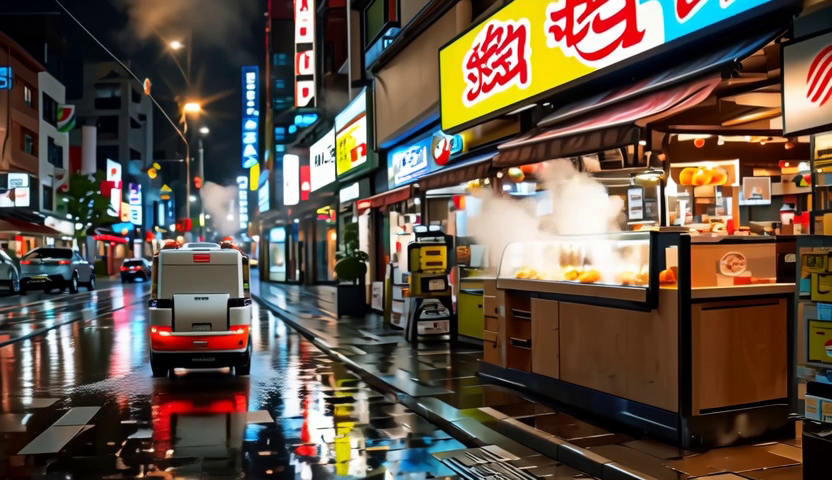 | 45-frame text-to-video baseline with night lighting, steam, reflections, and handheld camera intent. | |
Mountain drone baseline | mountain_drone_45f_8step.mp4 |  | 45-frame landscape prompt with aerial camera wording and broad scene composition. | |
Warehouse robot | robot_warehouse_61f_8step.mp4 | 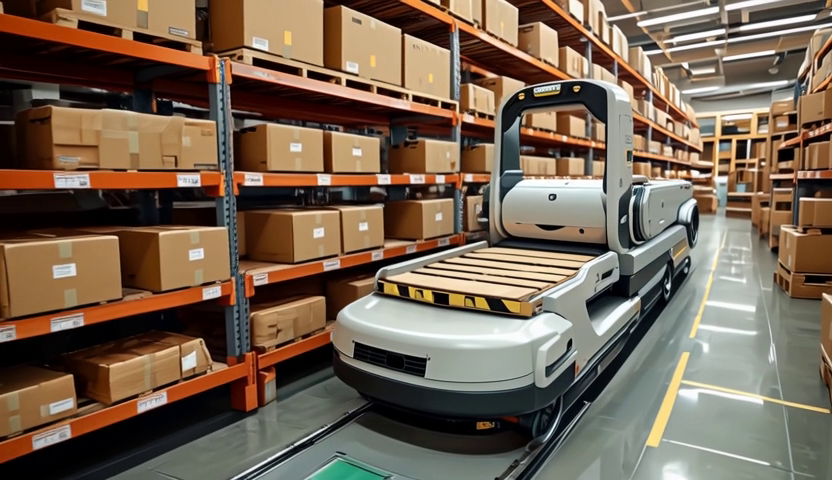 | Longer 61-frame subject-motion test with industrial tracking-camera language. | |
Product turntable | product_turntable_61f_8step.mp4 |  | Product-shot behavior with controlled lighting, object focus, and turntable motion. | |
Rain runway | runway_rain_neon_61f_8step.mp4 | 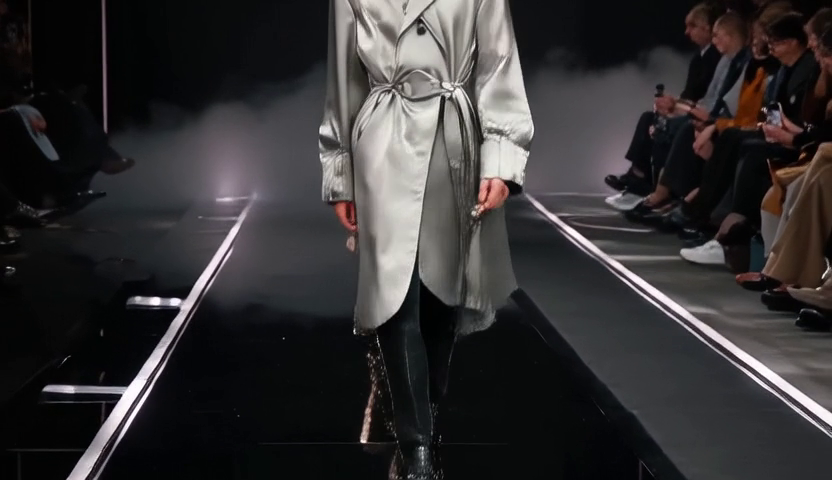 | Fashion motion, rain reflection, neon rim light, and more visually expressive prompt style. | |
Jazz club | jazz_club_spotlight_61f_8step.mp4 | 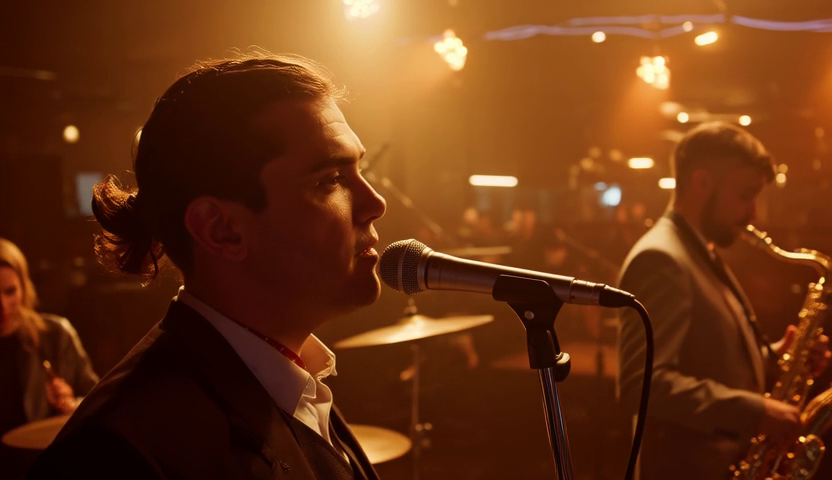 | Warm stage light, singer silhouette, and interior atmosphere. | |
Perfume macro | perfume_macro_water_61f_8step.mp4 |  | Macro commercial-product composition with glass, water droplets, and premium lighting. | |
Street-food flame | street_food_flame_61f_8step.mp4 | 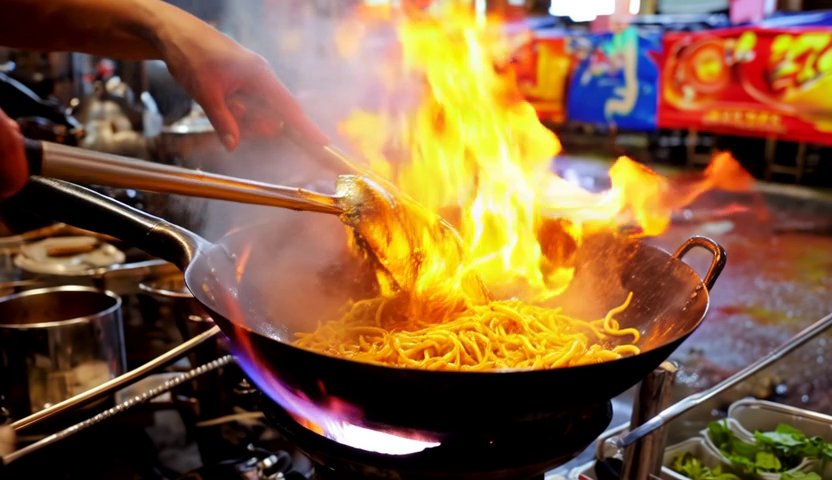 | Food action, flame, steam, sparks, and handheld energy. | |
Aurora train | aurora_train_window_61f_8step.mp4 | 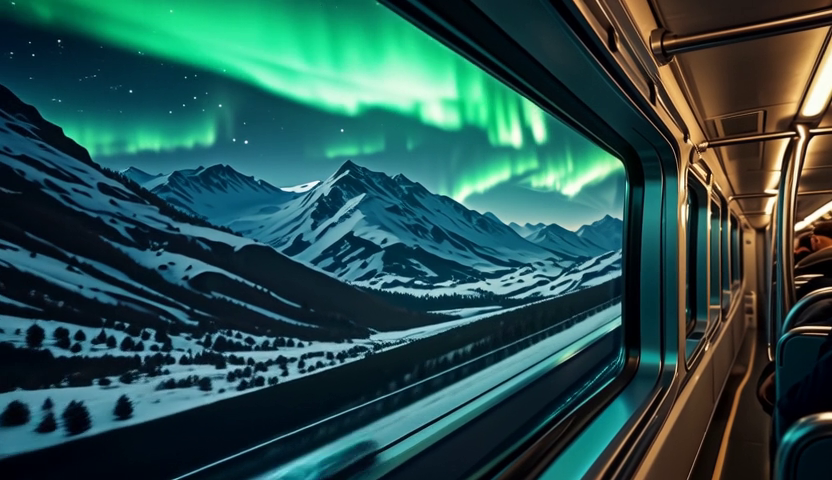 | Glass reflections, night travel mood, aurora motion, and window framing. | |
Desert rally | desert_rally_sunset_61f_8step.mp4 |  | Vehicle action, dust plume, sunset color, and tracking-camera prompt behavior. | |
Robot barista | robot_cafe_barista_61f_8step.mp4 |  | Sci-fi lifestyle action, steam, cafe environment, and foreground-object handling. | |
Rooftop dance | rainy_rooftop_dance_61f_8step.mp4 | 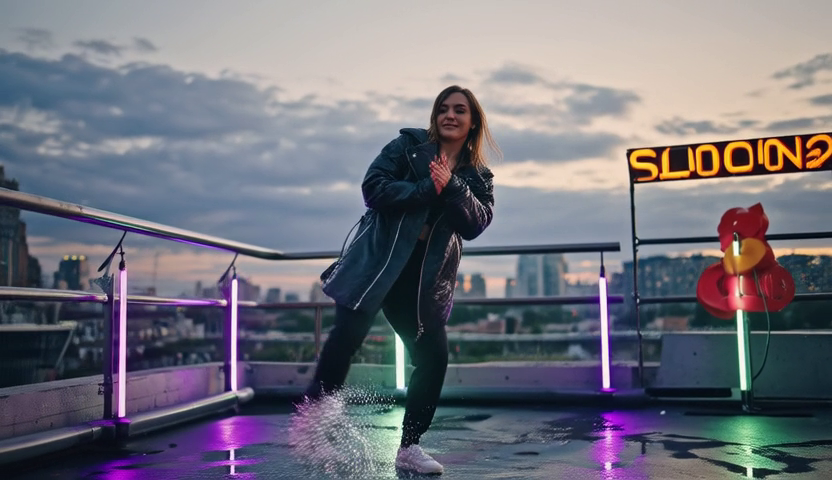 | Human motion, rain splash, neon background, and dance prompt behavior. | |
Underwater gallery | underwater_gallery_61f_8step.mp4 | 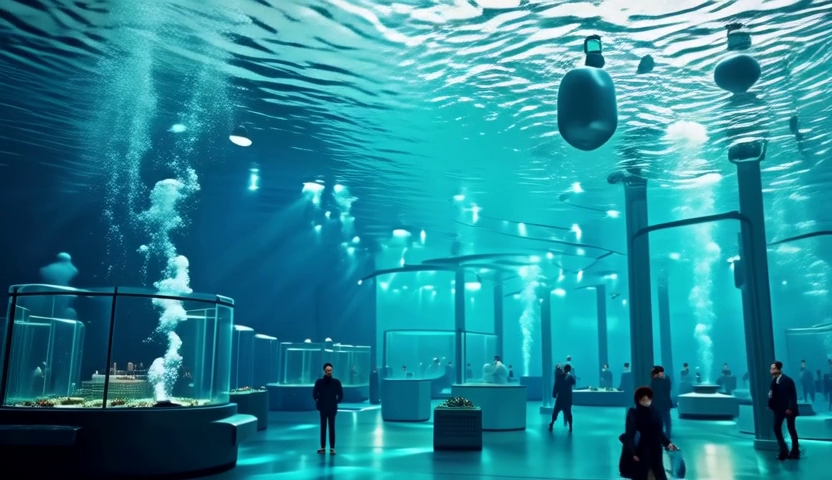 | Blue caustic lighting, gallery depth, visitors, and sci-fi interior framing. | |
Space greenhouse | space_garden_station_61f_8step.mp4 |  | Space-station plants, astronaut subject, Earth window, and slow camera-drift intent. | |
Rain sprint | sports_sprint_rain_61f_8step.mp4 | 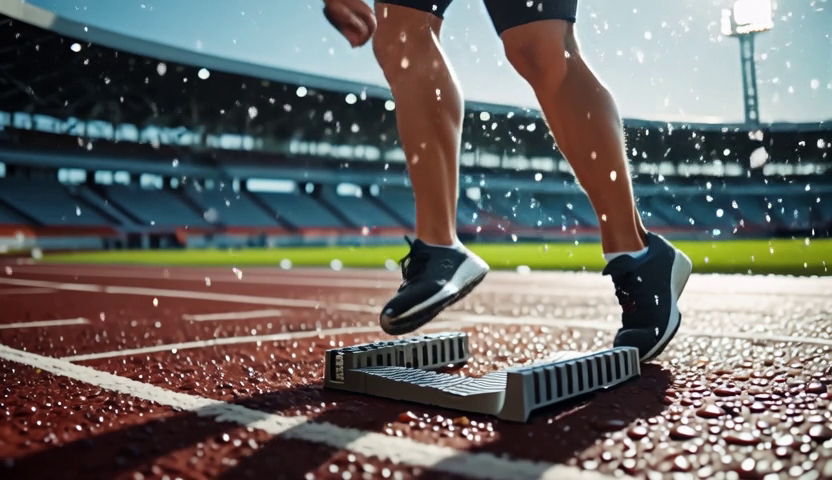 | Sports-ad acceleration, water droplets, stadium lighting, and low-angle drama. | |
Light museum | museum_light_installation_61f_8step.mp4 | 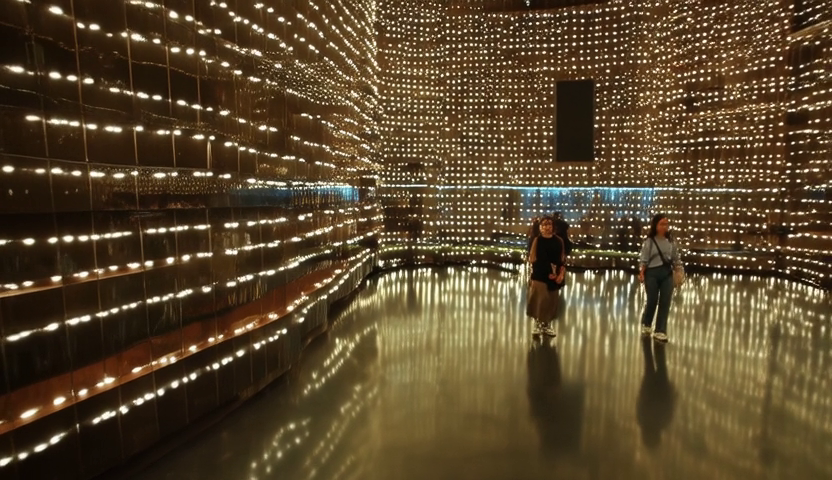 | LED installation, polished-floor reflections, and museum camera glide. |
Runtime Metrics
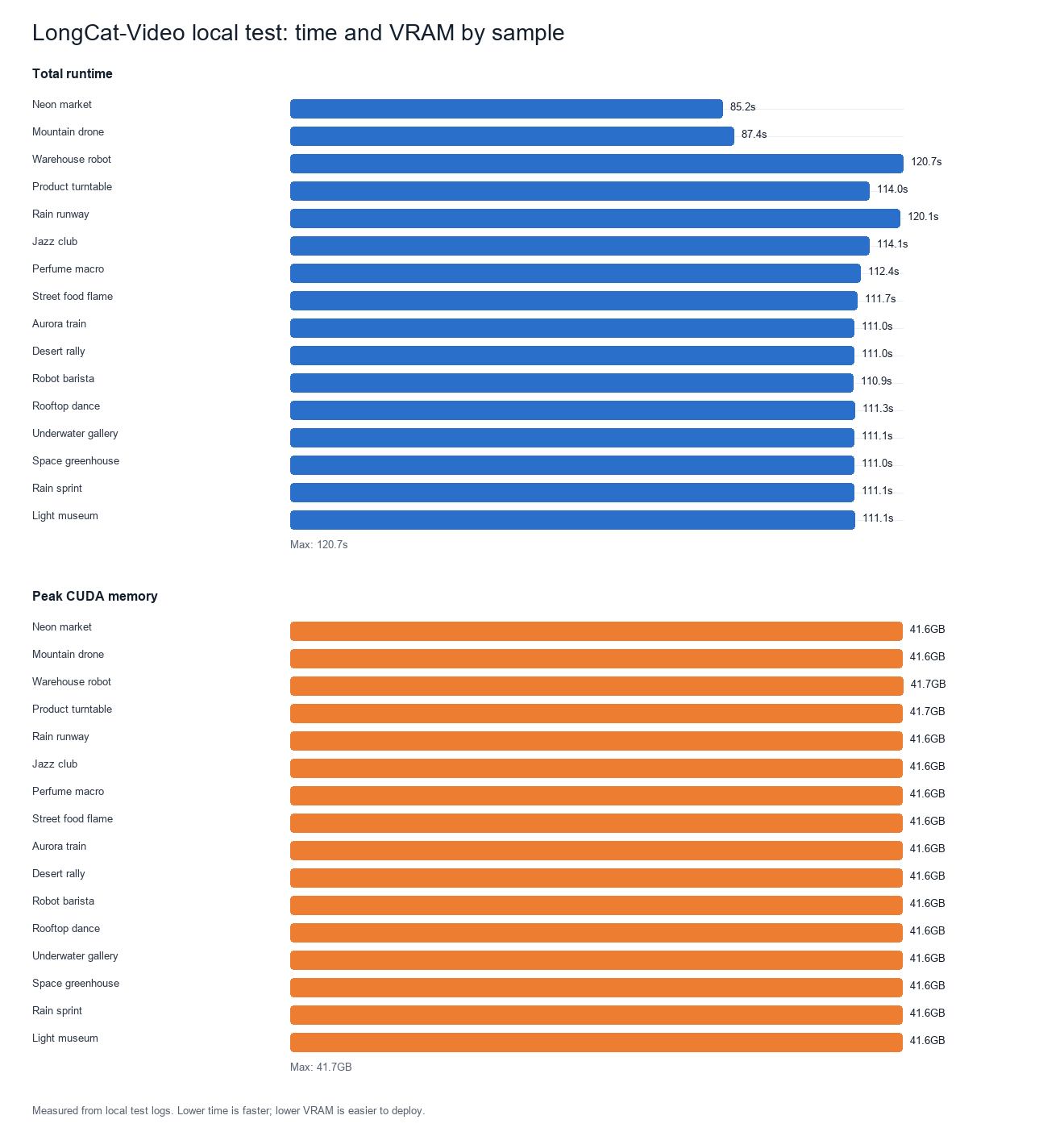
Summary: 45-frame checks land under 90 seconds total; most 61-frame clips sit around 111–120 seconds. Peak CUDA memory barely moves across prompts, staying near 41.6 GB — prompt style changes the creative result much more than it changes the hardware bill.
Sample | File | Prompt direction | Frames | Steps | Resolution | Inference time | Total time | Peak CUDA memory |
|---|---|---|---|---|---|---|---|---|
Neon market baseline | neon_market_45f_8step.mp4 | Night street, reflections, small robot | 45 | 8 | 832 x 480 | 60.687s | 85.196s | 41.618 GB |
Mountain drone baseline | mountain_drone_45f_8step.mp4 | Aerial sunrise landscape | 45 | 8 | 832 x 480 | 60.928s | 87.440s | 41.622 GB |
Warehouse robot | robot_warehouse_61f_8step.mp4 | Robot motion, shelves, conveyor belts | 61 | 8 | 832 x 480 | 87.114s | 120.665s | 41.663 GB |
Product turntable | product_turntable_61f_8step.mp4 | Headphone product shot, rotating table | 61 | 8 | 832 x 480 | 87.277s | 114.028s | 41.658 GB |
Rain runway | runway_rain_neon_61f_8step.mp4 | A cinematic fashion runway at night after rain | 61 | 8 | 832 x 480 | 86.567s | 120.101s | 41.645 GB |
Jazz club | jazz_club_spotlight_61f_8step.mp4 | A smoky underground jazz club with warm amber spotlights | 61 | 8 | 832 x 480 | 87.026s | 114.148s | 41.645 GB |
Perfume macro | perfume_macro_water_61f_8step.mp4 | Luxury perfume bottle macro product film on a glossy black surface | 61 | 8 | 832 x 480 | 87.067s | 112.394s | 41.645 GB |
Street-food flame | street_food_flame_61f_8step.mp4 | A chef in a night market flips noodles in a wok | 61 | 8 | 832 x 480 | 87.076s | 111.727s | 41.645 GB |
Aurora train | aurora_train_window_61f_8step.mp4 | Inside a modern glass train crossing snowy mountains at night | 61 | 8 | 832 x 480 | 87.114s | 111.027s | 41.645 GB |
Desert rally | desert_rally_sunset_61f_8step.mp4 | A rally car races across desert dunes at sunset | 61 | 8 | 832 x 480 | 87.098s | 111.027s | 41.645 GB |
Robot barista | robot_cafe_barista_61f_8step.mp4 | A sleek robot barista prepares latte art in a futuristic cafe | 61 | 8 | 832 x 480 | 87.107s | 110.913s | 41.645 GB |
Rooftop dance | rainy_rooftop_dance_61f_8step.mp4 | A dancer performs on a rainy city rooftop under neon signs | 61 | 8 | 832 x 480 | 87.114s | 111.293s | 41.645 GB |
Underwater gallery | underwater_gallery_61f_8step.mp4 | A futuristic underwater art gallery with glass walls | 61 | 8 | 832 x 480 | 87.151s | 111.131s | 41.645 GB |
Space greenhouse | space_garden_station_61f_8step.mp4 | A space station greenhouse with plants glowing under soft LEDs | 61 | 8 | 832 x 480 | 87.121s | 111.031s | 41.645 GB |
Rain sprint | sports_sprint_rain_61f_8step.mp4 | A sprinter launches from starting blocks on a rain-soaked track | 61 | 8 | 832 x 480 | 87.108s | 111.054s | 41.645 GB |
Light museum | museum_light_installation_61f_8step.mp4 | A contemporary museum light installation with thousands of tiny moving LEDs | 61 | 8 | 832 x 480 | 87.157s | 111.139s | 41.645 GB |
The unified table makes the 16 outputs easier to compare as one test set. The 61-frame outputs are still short technical samples, but the prompt range is broad enough to judge more than a simple smoke test: fashion, music stage, product macro, food action, travel, vehicle motion, cafe robot, dance, underwater gallery, space greenhouse, sports rain, and museum installation.
The important number is not only time. Peak memory stayed around 41.6 GB across the whole set. That means a 24 GB card is not a comfortable target for this test profile. A 48 GB GPU had enough room, but not a huge margin if a user increases frames, steps, resolution, or keeps extra services on the same device.
Raw metrics (JSON logs and per-run timing data) referenced throughout this review are available on request — see the Reproducibility Checklist for the verification order I’d recommend.
Generated Works Table
Sample | File | Input direction | What the clip verifies | Measured result |
|---|---|---|---|---|
Neon market baseline | neon_market_45f_8step.mp4 | Neon night market with wet pavement, steam, reflections, handheld movement | Scene construction, lighting response, environment coherence, LoRA loading, MP4 export | 45 frames, 832x480, 60.687s inference, 85.196s total, 41.618 GB peak |
Mountain drone baseline | mountain_drone_45f_8step.mp4 | Sunrise mountain drone shot with clouds, orange light, cinematic realism | Landscape composition, broad camera intent, non-urban prompt behavior | 45 frames, 832x480, 60.928s inference, 87.440s total, 41.622 GB peak |
Warehouse robot | robot_warehouse_61f_8step.mp4 | Compact warehouse robot moving between shelves and conveyor belts | Subject motion, industrial scene control, tracking-camera wording | 61 frames, 832x480, 87.114s inference, 120.665s total, 41.663 GB peak |
Product turntable | product_turntable_61f_8step.mp4 | Wireless headphone rotating on a glossy product turntable | Product-video framing, controlled lighting, object-focused prompt behavior | 61 frames, 832x480, 87.277s inference, 114.028s total, 41.658 GB peak |
Rain runway | runway_rain_neon_61f_8step.mp4 | Cinematic fashion runway at night after rain | Fashion movement, rain reflections, neon rim light, editorial lighting | 61 frames, 832x480, 86.567s inference, 120.101s total, 41.645 GB peak |
Jazz club | jazz_club_spotlight_61f_8step.mp4 | Smoky underground jazz club with warm amber spotlights | Stage mood, warm spotlights, singer silhouette, club atmosphere | 61 frames, 832x480, 87.026s inference, 114.148s total, 41.645 GB peak |
Perfume macro | perfume_macro_water_61f_8step.mp4 | Luxury perfume bottle macro product film on glossy black surface | Macro product framing, water droplets, premium commercial lighting | 61 frames, 832x480, 87.067s inference, 112.394s total, 41.645 GB peak |
Street-food flame | street_food_flame_61f_8step.mp4 | Chef in a night market flips noodles in a wok | Food motion, flame, steam, sparks, handheld energy | 61 frames, 832x480, 87.076s inference, 111.727s total, 41.645 GB peak |
Aurora train | aurora_train_window_61f_8step.mp4 | Inside a modern glass train crossing snowy mountains at night | Interior glass reflections, aurora motion, calm cinematic travel mood | 61 frames, 832x480, 87.114s inference, 111.027s total, 41.645 GB peak |
Desert rally | desert_rally_sunset_61f_8step.mp4 | Rally car races across desert dunes at sunset | Vehicle action, dust plume, sunset color, tracking-camera intent | 61 frames, 832x480, 87.098s inference, 111.027s total, 41.645 GB peak |
Robot barista | robot_cafe_barista_61f_8step.mp4 | Sleek robot barista prepares latte art in a futuristic cafe | Robot action, steam, cafe environment, lifestyle sci-fi framing | 61 frames, 832x480, 87.107s inference, 110.913s total, 41.645 GB peak |
Rooftop dance | rainy_rooftop_dance_61f_8step.mp4 | Dancer performs on a rainy city rooftop under neon signs | Human dance motion, rain splash, neon lighting, rooftop background | 61 frames, 832x480, 87.114s inference, 111.293s total, 41.645 GB peak |
Underwater gallery | underwater_gallery_61f_8step.mp4 | Futuristic underwater art gallery with glass walls | Blue caustic lighting, gallery depth, visitors, sci-fi atmosphere | 61 frames, 832x480, 87.151s inference, 111.131s total, 41.645 GB peak |
Space greenhouse | space_garden_station_61f_8step.mp4 | Space station greenhouse with plants glowing under soft LEDs | Greenhouse interior, astronaut subject, Earth window, slow camera drift | 61 frames, 832x480, 87.121s inference, 111.031s total, 41.645 GB peak |
Rain sprint | sports_sprint_rain_61f_8step.mp4 | Sprinter launches from starting blocks on a rain-soaked track | Sports acceleration, water droplets, stadium lighting, low-angle drama | 61 frames, 832x480, 87.108s inference, 111.054s total, 41.645 GB peak |
Light museum | museum_light_installation_61f_8step.mp4 | Contemporary museum light installation with thousands of tiny moving LEDs | Immersive LEDs, polished-floor reflections, art-film camera glide | 61 frames, 832x480, 87.157s inference, 111.139s total, 41.645 GB peak |
This sample set changed how I read the model. The strongest outputs were not the simplest validation scenes; the model looked more compelling when the prompt contained a clear commercial or cinematic hook, a specific lighting setup, and one main motion cue. The perfume macro, street-food flame, jazz club, rooftop dance, and space greenhouse clips are much better tests of whether LongCat-Video can make attractive short-form material than a generic warehouse or mountain prompt alone.
These are not illustrative placeholders. They are the generated works from the local run, and the images embedded above are extracted frames from the same MP4 files. One or two clips are not enough to judge a video model, so the set covers a neon street, an aerial landscape, robot motion, product framing, fashion, live-performance mood, food action, sports motion, and several sci-fi interiors.
Quality Notes
For an 8-step quick test, the output was coherent enough to judge motion and composition. The mountain prompt produced a recognizable wide scenic view, the neon market prompt produced a plausible night scene with wet pavement and lighting contrast, the warehouse prompt tested subject motion, and the product prompt tested controlled object-focused framing. I would not treat these as final creative deliverables at this step count — the point of the test was to validate the local pipeline, sample several directions, and measure cost.
The model seems strongest when the prompt describes a cinematic scene with camera movement, lighting, and a clear environment. It is less ideal when a user wants exact object control, long narrative consistency, or production-ready detail from a tiny number of steps. LongCat-Video is a foundation model: it gives broad visual motion, not a finished editing suite.
What Stood Out During Testing
The first thing I noticed is that LongCat-Video behaves like a serious research model rather than a small demo project. The code path is not just a single model call — it loads a tokenizer, a large UMT5 text encoder, a WAN-style VAE, a scheduler, a sharded DiT model, and then optionally applies LoRA modules for faster or refined generation. That matters because setup failures can come from several places. If the tokenizer loads but the text encoder shards are missing, the run will fail early. If the DiT config still points to FlashAttention but the environment lacks FlashAttention, the run can fail only after large weights are already loaded. If the VAE is missing, the diffusion loop may work but decoding cannot complete. A practical LongCat-Video review needs to mention that the model is not small enough for casual trial and error.
The second thing I noticed is that the distill path is the right first test for most users. A full 50-step sample is a better quality test, but it is not the best first diagnostic. The 8-step sample I used is short enough to run repeatedly while still exercising the important parts of the stack: text prompt encoding, DiT denoising, LoRA loading, VAE decoding, video writing, CUDA memory behavior, and xFormers attention. That is a better first milestone than trying the largest official demo and waiting a long time before discovering an environment mismatch.
The third point is memory pressure. A peak around 41.6 GB for only 45 frames tells me the model is not merely “large”; it is large in a way that shapes how people should test it. On a 48 GB card, the run had room, but I would still avoid running other GPU-heavy services at the same time, and I would not assume a longer clip scales casually — more frames, larger resolution, full-step sampling, and refinement all add pressure. If a user only has a 24 GB card, I would not recommend starting with this exact configuration unless they are prepared to experiment with offloading, lower frame counts, more aggressive quantization, or a different model.
Prompt Behavior
Both prompts I used were intentionally visual and specific. The neon market prompt included night lighting, rain, reflections, a small delivery robot, steam, and handheld camera movement. The mountain prompt included an aerial view, sunrise, orange light, peaks, moving clouds, and cinematic realism. Those are the kinds of details that help a video model organize a shot — they describe not only objects, but also lighting, motion, environment, and camera intent.
LongCat-Video responded better to that kind of prompt than I would expect it to respond to a flat object list. A prompt like “robot, city, rain” would probably be weaker because it leaves the model to infer everything about camera and mood. The generated samples are not perfect, but they show that the model can build a coherent scene when the text gives it a strong visual direction. For readers who want to reproduce the test, I would recommend starting with one clear location, one camera style, one lighting condition, and one main motion cue. Overloaded prompts can make the model chase too many goals at once.
The limitation is precision. LongCat-Video is not a deterministic scene layout tool. If a prompt asks for a very specific prop position, exact object count, exact text, or a strict multi-step action, I would not expect perfect adherence from a short 8-step run. The model is better understood as a generative video engine that can produce a plausible shot from a well-written direction — it is less like a timeline editor and more like a cinematic ideation engine.
What I Would Test Next
If I were extending this LongCat-Video benchmark into a longer study, I would run five additional groups. First, I would compare 8, 16, and 50 steps on the same prompt to measure the quality-speed curve. Second, I would test more frame counts, because 45 frames is a quick validation clip, not a long-form sample. Third, I would run an image-to-video prompt to see how strongly the model preserves a starting frame. Fourth, I would test the refinement path separately, because refinement is one of the reasons the official demo is more demanding. Fifth, I would compare xFormers and FlashAttention on the same hardware if a compatible FlashAttention wheel is available.
Those follow-up tests would make the review stronger, but they are not required to answer the first practical question. The first question is whether LongCat-Video can be made to run locally with official weights and produce real media. My answer from this test is yes.
Comparison With Similar Video Models
Compared with popular open video systems such as Wan-style pipelines, HunyuanVideo-derived workflows, and ComfyUI-packaged video nodes, LongCat-Video feels closer to a large integrated research release than a small community workflow. The advantage is that the repository includes multiple demo directions: text-to-video, image-to-video, video continuation, long video, interactive video, and Avatar-specific scripts in the same ecosystem. The downside is that first-time setup has more moving parts.
| Alternative | What it is best for | How it differs from LongCat-Video | My practical takeaway |
|---|---|---|---|
| Wan2.1 / Wan2.2 | Open video generation workflows with strong community adoption and ComfyUI usage | Wan repositories and workflows are often easier to encounter in community pipelines; Wan2.1 documents T2V models at 480p/720p, while Wan2.2 adds a 5B text-image-to-video path | I would compare LongCat-Video against Wan when the question is local open-model practicality and ecosystem support |
| HunyuanVideo / HunyuanVideo 1.5 | Large open video foundation-model research and multimodal video-generation tasks | HunyuanVideo is framed as a broad open-source video foundation model; HunyuanVideo 1.5 materials emphasize multiple tasks such as text-to-video, first-frame-to-video, key-frame-to-video, and video-to-video editing | I would use HunyuanVideo as the closest research-scale open comparison for breadth and ambition |
| ComfyUI video nodes and packaged workflows | Repeatable creator workflows, node-based experimentation, lower-friction local testing | ComfyUI hides some orchestration behind reusable graphs, while LongCat-Video exposes more of the raw repository and model-loading path | ComfyUI is easier for iterative creators; LongCat-Video is better when I need to understand and measure the model stack directly |
| Runway-style hosted video systems | Fast browser-based creative production and polished UX | Hosted systems hide weights, kernels, environment setup, and queueing; LongCat-Video exposes all of those costs but gives local control | Hosted tools win on convenience; LongCat-Video wins on inspectability and local ownership |
| Kling / Seedance-style hosted systems | Cinematic consumer-facing video generation with strong product packaging | These tools compete for output appeal and speed, not local reproducibility; Seedance 2.0 is positioned around multimodal video input and editing, while LongCat-Video is an open local stack | I would use them as quality references, not as deployment equivalents |
| LongCat Avatar 1.5 | Audio-driven people, presenters, singing, and multi-person avatar clips | Avatar 1.5 depends on LongCat-Video foundation pieces but adds audio processing, reference-image conditioning, and avatar-specific DiT weights | Use LongCat-Video for scenes; use Avatar 1.5 when the job starts with a person and a voice |
The most useful comparison axis is not a single leaderboard score. It is control versus convenience. LongCat-Video gives me the code path, the weights, the attention-backend decision, and the ability to measure VRAM directly. That makes it more valuable for engineering evaluation than a closed browser tool. It also makes it harder to recommend to a non-technical creator who simply wants a finished clip in a few minutes.
The second axis is task fit. Wan and Hunyuan-style models are natural comparisons for open text-to-video and image-to-video experiments. Runway, Kling, and Seedance are more relevant when the reader cares about a polished creative product. LongCat Avatar 1.5 is not a competitor in the usual sense; it is the specialized avatar branch that answers a different question inside the same ecosystem.
Compared with hosted commercial systems, LongCat-Video gives more local control but less convenience. A hosted model hides the weight download, CUDA stack, attention kernel, and runtime details. LongCat-Video exposes all of them. For a developer, that exposure is useful because you can inspect the pipeline, measure memory, replace attention implementations, and integrate the model into your own tooling. For a non-technical creator, that same exposure is friction.
The best comparison is therefore not only "which output looks better?" It is "which workflow do I need?" If the goal is immediate browser-based production, a hosted video tool will feel easier. If the goal is local experimentation, model integration, reproducible tests, or technical evaluation of a large open video model, LongCat-Video is much more relevant.
Practical Limitations
Operational weight. The biggest limitation in my test was not output quality; it was operational weight. Downloading the official checkpoint takes time and bandwidth. The foundation model uses many large shards. The first successful run requires patience because small errors can appear after large components are already in place. That is why I recommend keeping a written setup log and validating each stage: CUDA visibility, PyTorch version, model files, attention backend, then a short 45-frame run.
Short-test interpretation. Short tests can make the model look either better or worse than it really is. At 8 steps, the model is fast enough to inspect, but it is not necessarily showing its best quality. A weak 8-step detail should not be treated as the final ceiling. At the same time, a good 8-step sample should not be oversold as production consistency — it is a diagnostic and early creative sample.
Product-positioning limitation. LongCat-Video is broad. That makes it powerful, but it also makes the user responsible for prompt design and downstream editing. It does not automatically solve lip sync, character identity, voice timing, or presenter-video needs. Those are the problems LongCat Avatar 1.5 is designed to address.
Who Should Try It
I would recommend LongCat-Video to developers, AI video researchers, technical creators, and teams that already understand GPU deployment. It is worth trying if you want to compare open video models, build a local video generation service, test prompt behavior, or understand the foundation layer behind LongCat's avatar models.
I would not recommend it as the first local AI model for someone who has never managed CUDA dependencies. The install is not impossible, but the failure modes are more complex than a small text model or image model. The best first experience is on a clean machine with a large GPU, enough disk space, and a willingness to read logs.
Editorial Verdict
LongCat-Video is impressive because it ran locally with official weights and produced sixteen coherent 480p clips from a wide range of text prompts. The results were coherent enough to prove the pipeline and useful enough to support a real review across scene, landscape, subject-motion, product-shot, fashion, food, sports, and sci-fi directions. The model also made its cost clear: large download, high VRAM, attention backend decisions, and a setup process that rewards careful debugging.
For me, that makes LongCat-Video a serious foundation model rather than a casual toy. I would use it as a technical base for video experiments and as context for understanding LongCat Avatar 1.5. I would not present it as the easiest path for a non-technical creator. Its value is control, openness, and broad video generation capability. Its cost is setup complexity and hardware demand.
Reproducibility Checklist
If I were handing this LongCat-Video review to another developer, I would ask them to reproduce it in stages instead of running the full demo immediately.
- Confirm the GPU is visible through PyTorch, not only through
nvidia-smi. - Confirm all model folders are present: tokenizer, text encoder, VAE, scheduler, DiT shards, and LoRA.
- Load the text encoder alone.
- Load the DiT with the intended attention backend.
- Generate a very short 480p clip.
Only after that would I try longer outputs or refinement.
This staged approach matters because the model is large enough that failures are expensive. A missing file or wrong attention flag can waste time after several large components have loaded. A small validation run gives confidence before a user commits to longer generations. It also makes debugging more precise: if the text encoder loads but the DiT fails, the problem is probably in DiT weights or attention; if denoising completes but video writing fails, the issue is likely decoding or media dependencies.
I would also save metrics for every run. The metrics in this review were useful because they made the review specific: the 45-frame clips took about 60.7 seconds of inference, while the 61-frame clips took about 87.1 seconds of inference, with all sixteen runs landing around 41.6 GB peak CUDA memory. Those numbers make the judgment more useful than a subjective impression.
Safety and Responsible Use
LongCat-Video is a general video generation model, so the usual synthetic media cautions apply. It should not be used to create deceptive footage of real people, misleading news-like scenes, or material that implies real events occurred when they did not. The model can create plausible visual motion, and that makes context important when sharing outputs.
For commercial or public content, I would keep generated clips clearly framed as AI-generated unless the surrounding context already makes that obvious. I would also avoid prompts that imitate private individuals, copyrighted characters, or real events in a misleading way. These concerns are not unique to LongCat-Video, but a hands-on evaluation should mention them because video feels more persuasive than a still image.
For internal research, the safer workflow is to keep prompts, seeds, model versions, and output files logged. That makes results easier to audit later. If a team plans to integrate LongCat-Video into a product, it should also think about user-uploaded prompts, moderation, and whether generated videos need visible disclosure.
Operational Reading of the Results
The most useful way to read these numbers is as an operating envelope, not as a beauty contest. The model completed sixteen 480p runs with stable peak memory around 41.6 GB. That tells me the tested path is reproducible on a 48 GB card, but it also tells me there is not much room for casual expansion. If a reader raises resolution, frame count, step count, or refinement without changing anything else, the first bottleneck will probably be memory rather than raw compute time.
The similar memory peaks across sixteen visually distinct prompts are also meaningful. The neon scene, mountain scene, warehouse robot, and product shot behave very differently on screen, but the memory profile was nearly identical across the whole set. That suggests the cost is dominated by the model configuration, frame count, resolution, and denoising schedule, not by prompt wording. In a production evaluation, I would therefore budget memory from the chosen generation settings rather than from the perceived complexity of the prompt.
The load time around 24–26 seconds is another practical clue. It is short compared with the full first-time download, but it is long enough that a web product should not reload the whole model for every request. For a service, the model should be warmed once, kept resident, and protected with a queue.
The inference time around 61 seconds for 45 frames and 87 seconds for 61 frames means the tested configuration is better suited to batch generation, review queues, or developer experimentation than to instant interactive editing. This does not make the model weak; it simply defines the product shape. A local open model with 77.6 GiB of weights should be evaluated as infrastructure, not as a lightweight browser effect.
I would still treat these sixteen outputs as baseline evidence rather than final marketing samples. At 8 steps, the model shows that it can produce coherent motion and composition across a wide prompt range, but the same prompt at more steps may improve detail and temporal smoothness. The honest claim is that LongCat-Video works locally and gives measurable short-video results across many prompt types. The stronger claim — that it consistently produces production-ready video across longer durations — would require a larger test matrix than I ran here.
Failure Modes I Would Watch
Attention backend mismatch. The official code path expects FlashAttention in common configurations, while my environment used xFormers because FlashAttention was not available. This is not a minor detail — if the wrong flags are used, the model can fail after the user has already spent time downloading and loading large components. Any public guide should state the actual attention backend used in the test.
Partial checkpoint download. LongCat-Video has many large shards and subfolders. A missing VAE, text encoder shard, tokenizer file, scheduler file, or LoRA can produce errors that look unrelated to the real cause. I would not trust a setup until every required subfolder is present and the first short run has completed.
Overinterpreting short clips. A 45–61-frame output is enough for validation, but not enough for long-range temporal consistency. LongCat-Video may handle a short cinematic shot well and still need more testing for longer movement, identity persistence, camera changes, or multi-shot storytelling. This is why I separate "the model runs locally" from "the model is ready for every production workflow."
Writing prompts as if the model were an editor. LongCat-Video responds well to visual direction, but it does not guarantee exact placement, exact text rendering, or strict object counts. Prompts should describe a shot, not a frame-accurate storyboard. If a project needs exact continuity, the output should go through a human editing and selection process.
Final Recommendation
My recommendation is to treat LongCat-Video as a capable but demanding foundation model. It is worth testing if you have a 48 GB GPU, enough storage, and a reason to inspect or integrate an open video model. It is less attractive if your main goal is immediate production with minimal setup. The strongest reason to try it is not that it is effortless — it is that it gives developers a real local video generation stack with official weights and measurable behavior.
One final practical note: I would keep the first shown examples modest. A short, honest 480p test with metrics is more trustworthy than a polished claim that hides the environment work. Readers evaluating LongCat-Video need to know both sides: it can generate real local video, and it asks for serious hardware discipline. That balance is what makes the review useful.
Setup Experience
This is where the LongCat-Video setup story matters for readers. A simple LongCat-Video install is possible, but only if the user treats attention libraries and GPU memory as first-class requirements rather than optional details. The repository itself is clear enough, yet the default path assumes an environment that already matches the authors' preferred CUDA stack. My local test was useful because it exposed a realistic mismatch: PyTorch CUDA wheels installed cleanly, xFormers installed cleanly, but FlashAttention was not available without extra toolchain work. For production documentation, the install notes should not stop at pip install -r requirements.txt; they should explain which attention backend is actually being used and why.
The setup was heavier than a typical image model. The official dependency list pins PyTorch 2.6.0, Diffusers, Transformers, Streamlit, AV, OpenCV, and FlashAttention. On my machine, PyTorch 2.6.0 with CUDA 12.4 worked immediately, but FlashAttention was not installed because the server did not have a CUDA compiler. The repository code has an xFormers branch in attention modules, so I loaded the transformer with enable_flashattn2=False and enable_xformers=True.
Two practical dependency notes mattered:
| Issue | What happened | Practical fix |
|---|---|---|
| FlashAttention default | Model config enables FlashAttention 2 by default | Use xFormers for the quick test or install a compatible FlashAttention wheel/toolchain |
Missing accelerate | Diffusers warned that low CPU memory loading was unavailable | Install accelerate for a cleaner production setup |
Installation Snapshot
For a LongCat-Video install that mirrors this test, I would start with the official repository and weights, then add the attention override only if FlashAttention is unavailable. The commands below are not a universal replacement for the official README; they are the reproducible shape of the environment I used for this review.
git clone https://github.com/meituan-longcat/LongCat-Video.git
cd LongCat-Video
uv venv --python 3.10 .venv
source .venv/bin/activate
uv pip install --index-url https://download.pytorch.org/whl/cu124 \
  torch==2.6.0 torchvision==0.21.0 torchaudio==2.6.0
uv pip install -r requirements.txt
uv pip install xformers==0.0.29.post3 --index-url https://download.pytorch.org/whl/cu124
huggingface-cli download meituan-longcat/LongCat-Video --local-dir ./weights/LongCat-Video
If FlashAttention cannot be installed cleanly, the model constructor needs an xFormers override for the quick path:
dit = LongCatVideoTransformer3DModel.from_pretrained(
    "weights/LongCat-Video",
    subfolder="dit",
    torch_dtype=torch.bfloat16,
    enable_flashattn2=False,
    enable_flashattn3=False,
    enable_bsa=False,
    enable_xformers=True,
)
Best Use Cases
LongCat-Video is best for developers and technical creators who want a locally testable video foundation model and are comfortable working with large checkpoints. It is a good fit for prompt experiments, pipeline integration, short cinematic samples, and comparison testing against other video models such as Wan, HunyuanVideo, Kling-style hosted systems, or Seedance-style commercial services.
It is not the easiest model for a casual browser user. The download is large, the default demo is ambitious, and the memory requirement is meaningful. If you want a product workflow for audio-driven characters, LongCat Avatar 1.5 is the more focused model.
Scorecard
| Area | Score | Notes |
|---|---|---|
| Local setup clarity | 7/10 | Official repo is usable, but attention dependencies need care |
| Hardware friendliness | 6/10 | Works on 48 GB in this test; not friendly to smaller GPUs |
| Short video generation | 8/10 | Coherent 480p clips across sixteen prompt directions |
| Speed | 7/10 | About 61s inference for 45 frames and 87s for 61 frames at 8 steps |
| Practical reproducibility | 7/10 | Good once the xFormers path is understood |
FAQ
Is LongCat-Video open source? The code is published on GitHub and the official weights are available on Hugging Face. Check the current license and model page before commercial use.
Can LongCat-Video run on one GPU? Yes, my 480p tests ran on one 48 GB GPU. Peak CUDA memory stayed around 41.6 GB across all sixteen samples.
Does it require FlashAttention? The official config enables FlashAttention 2 by default. My test used xFormers instead because the server did not have a CUDA compiler for FlashAttention.
Should I use LongCat-Video or LongCat Avatar 1.5? Use LongCat-Video for general text-to-video testing — scenes, products, landscapes, action. Use LongCat Avatar 1.5 when the job is audio-driven talking or singing avatar video built from a reference image and voice.
Can it run on a 24 GB consumer GPU? Not comfortably with this exact configuration. Peak memory in this test stayed near 41.6 GB, so a 24 GB card would likely require offloading, lower frame counts, or more aggressive quantization — none of which were tested here.
How long does a typical clip take to generate? In this 8-step test, 45-frame clips took roughly 85–87 seconds total and 61-frame clips took roughly 111–121 seconds total, including load and export time — not counting the initial model download and warm-up.